
Digital Signage Software to Design, Schedule and Manage Every Screen
Written by Khalid Qadir, Co-Founder & VP Business Development at E Display
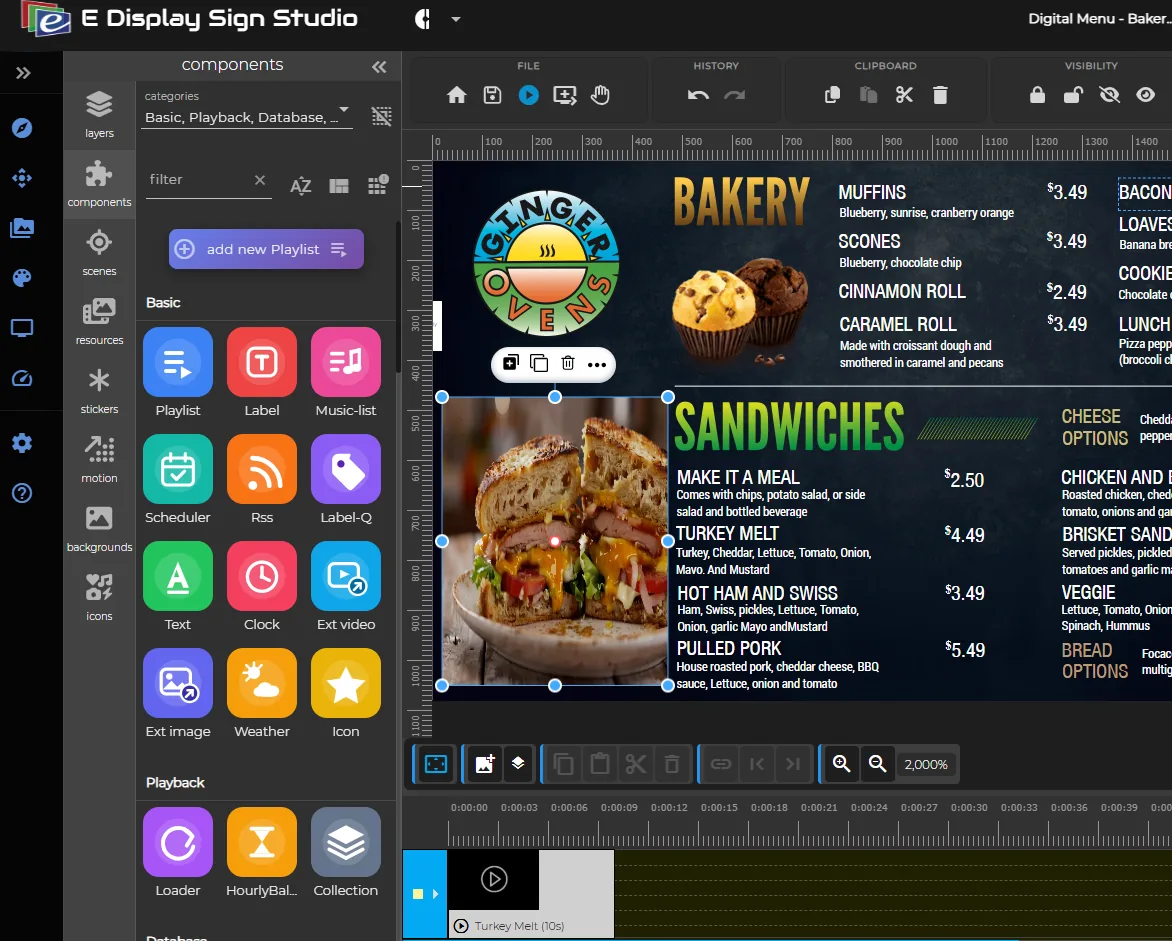
Effortlessly design, manage, and control your digital signage system across multiple locations with these key features:
- Built-in apps & ready-to-use templates
- Remote device controls & live previews
- Simple publishing of media, playlists & layouts
Updated · 12 min read
What Is Digital Signage Software?
Digital signage software is a cloud content management system for physical screens. You design or upload content, arrange it into playlists, set a schedule, and the software pushes it to every connected display, whether that is one menu board or two hundred screens across fifteen buildings. The software is the control layer of a digital signage system: the screens and media players are the hardware, and the software decides what plays, when, and where.
The difference between real signage software and the shortcuts people try first is autonomy. A USB stick cannot be updated remotely. A laptop mirroring a slideshow has to stay awake. A browser tab left open goes blank after an operating system update or a Wi-Fi drop. Signage software runs unattended: content plays to schedule, caches locally so it survives a network outage, updates remotely, and scales with user roles and device controls as your screen count grows.
Who uses it
Marketing teams design and schedule promotions. Operations managers run menu boards and price changes. IT teams deploy and monitor devices. Facilities teams handle wayfinding and lobby screens. In practice the same platform serves a single-screen cafe and a hospital network, which is why our industry solutions cover restaurants, retail, healthcare, education, hospitality, corporate offices and transportation.
Where E Display fits, and where it does not
E Display is a cloud signage platform priced at a flat $8 per screen per month with no feature tiers, and a media player included free with each new yearly licence, shipped free in the US and Canada. That puts software plus hardware at $96 per screen for year one. We pair hundreds of commercial templates with content design and installation from our own team across North America.
We are strongest for menu boards, directories, and multi-location rollouts that want one predictable per-screen number and a person to call. We are not the right fit if you want to self-host the CMS on your own servers, or if you need a deep enterprise governance stack such as directory sync and multi-stage approval workflows.
How E Display Compares to Other Platforms
Platforms mainly differ in how they price screens, whether player hardware is included, and which buyer they were built for. E Display is a flat $8 per screen with a media player included on yearly plans. For a full side-by-side of 10 platforms on price, players, templates and support, read our best digital signage software comparison, or open a head-to-head breakdown on the comparison hub.
Revolutionize Your Digital Signage Experience
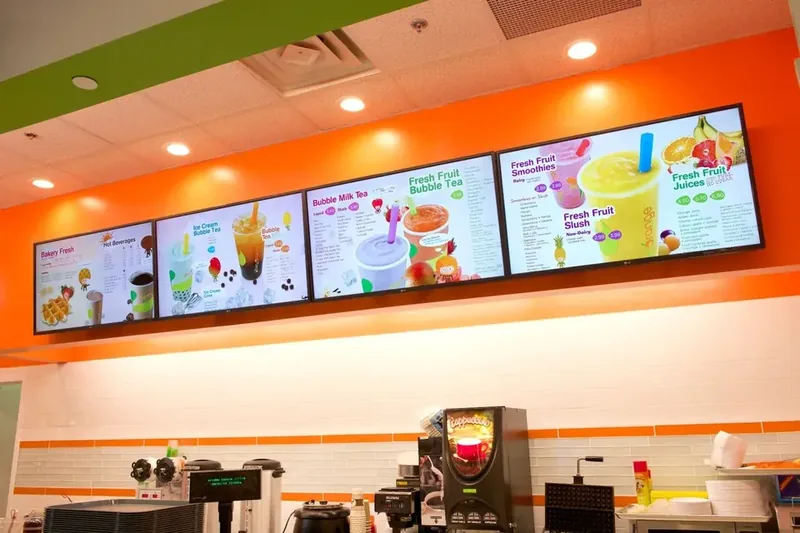
Easily manage and update content across one or hundreds of screens with our powerful cloud-based digital signage software. Control your displays remotely, ensuring consistent messaging and real-time updates from anywhere in the world.
Request InfoEffortless Digital Signage Management: Anytime, Anywhere
Take full control of your digital signage network with our cloud-based solution. Whether you manage a single screen or hundreds across multiple locations, our intuitive platform lets you update content, schedule playlists, and monitor devices remotely, ensuring seamless and consistent messaging without the hassle. Also called e-signage or electronic signage outside North America. Evaluating options? Compare digital signage platforms to see how E Display stacks up on pricing, players, and support.
Scalability
Effortlessly expand from small-scale deployments to large networks.
Full Control
Manage and monitor remotely, even with offline playback, ensuring uninterrupted service.
Powerful E Display Digital Signage Software Features
Everything you need for seamless content management across your entire screen network.
User-Friendly Interface
Easy-to-use design for quick content updates and management.
Customizable Templates
Hundreds of templates to choose from, adaptable to your brand's needs.
Centralized Control
Manage all screens from a single dashboard, no matter the location.
Advanced Scheduling
Set up playlists, schedules, and content changes ahead of time.
Real-Time Updates
Push updates instantly to all connected displays, ensuring up-to-date content at all times.
Offline Playback
Screens keep playing even without internet, content resumes syncing when back online.
How Digital Signage Software Works
A streamlined process for creating, managing, and displaying content on your digital screens.
Create Content
Design content using a wide range of templates, built-in apps and tools, or upload your own images and videos.
Schedule & Manage
Organize content into playlists, set display schedules, and manage every screen from one dashboard.
Deploy Remotely
Publish to your screens in real time from anywhere, keep messaging consistent across every location.
One screen, lots of cool Apps















Digital Signage Software vs Digital Signage CMS
These two terms are used interchangeably, and for buying purposes they describe the same product. The small distinction is scope: digital signage software is the whole system, including the player application running on each screen, while the CMS is the web dashboard where you design, schedule and publish. A few vendors also sell an on-premise CMS you host yourself, which shifts servers, updates and security patching onto your IT team.
Because the labels are inconsistent, compare capabilities instead: does it schedule by daypart, does it group screens by location, does it cache content for offline playback, and does a player come with it? Those answers matter. The word on the pricing page does not. For a step-by-step look at the dashboard, see our digital signage CMS guide, and for hosting choices see cloud-based vs on-premise signage.
Open Source and Free Digital Signage Software
Free options genuinely exist. Xibo is the best-known open source platform and is free to self-host, several commercial platforms offer a free single-screen tier, and a handful of low-cost tools will run a basic loop for a few dollars a month.
The honest trade-off is that free in licence terms is not free in total. Self-hosting means you supply the server, the upgrades, the security patching, the backups and your own support, and player licences can still apply per device. For a technical team that wants full control, that is a fair deal. For a restaurant group or a clinic network, the hours usually cost more than a per-screen subscription. Our E Display vs Xibo comparison walks through that maths, and the cheapest digital signage guide covers the low-cost end including hardware.
Interactive and Touch Screen Signage Software
Interactive signage adds a tap layer on top of playback: touch menus, product finders, self-service check-in and building directories people can search. It needs two things, a platform with interactive zones and, usually, a wayfinding module, plus a touch-capable display or a touch overlay on an existing screen.
Our advice is to be selective. In most estates a small number of screens genuinely benefit from touch, typically lobby directories and kiosks, while the rest simply loop content. Paying an interactive tier across every screen is one of the more common ways signage budgets inflate. If wayfinding is what you are after, start with our guide to digital wayfinding.
12 Features to Evaluate Before You Buy
Use this as a scoring sheet on any two platforms you shortlist. The first two decide your budget; the rest decide whether the screens stay current after month three.
Flat pricing, or tiers
A flat per-screen rate is predictable. Tiered pricing means one feature can lift the cost of every screen you own. Always price the tier above yours.
Player hardware terms
Ask plainly whether a media player is included, sold separately, or must be sourced by you. At $50 to $150 per screen, hardware is usually the biggest hidden line.
Offline playback
Screens should keep playing from local cache when the network drops, then resync automatically. Without it, a Wi-Fi blip becomes a blank screen in front of customers.
Template library
Commercial templates for menu boards, directories and promotions get you live in a day. A blank canvas means hiring a designer or living with something plain.
Multi-zone layouts
Splitting a screen into content, a ticker and a sidebar is standard for menu boards and lobbies. On some platforms it is locked behind a higher tier.
Scheduling and dayparting
Breakfast to lunch menu switches, weekend pricing and term-time calendars all need time-based rules, not manual swaps.
Screen grouping
Publishing to "all Toronto stores" rather than 14 individual screens is what makes a multi-location rollout manageable.
Remote device control
Reboot, check status, take a live screenshot and push updates without sending anyone to the site.
User roles
Decide who publishes, who approves and who only views. Even a small team wants a manager who cannot accidentally overwrite the corporate loop.
Live data and apps
Weather, social feeds, spreadsheets, web pages and dashboards. Check which of these are included rather than add-ons.
Support and timezone
Is support included or an extra, and is it answering in your working hours? Self-serve pricing often means self-serve troubleshooting.
Contract length
Month-to-month, quarterly or a locked annual term. Flexibility matters most in the first year, while you are still learning what your screens should say.
Digital Signage Software Pricing
E Display is a flat $8 per screen per month with no feature tiers, and a media player is included free with each new yearly licence ($50 on quarterly plans). See every cost on our digital signage pricing page, or build a full project estimate with the budget calculator.
How to Choose Digital Signage Software: 7 Steps
Do not start from "which platform is best". Start from what your screens have to do, then let that narrow the field.
- 1
Write down what the screens must say
A menu with prices, a staff dashboard, a room directory or a promotion loop. The job decides the features, not the other way round.
- 2
Count screens and locations
Five screens in one building and five across five cities are different problems. The second one needs screen grouping and remote control.
- 3
Check what hardware you already own
Commercial displays with a built-in player, existing Android boxes or nothing at all. This is where quotes diverge most.
- 4
Price the whole first year
Software, players, mounts, cabling, installation and any design work. Compare totals per screen, never monthly rates alone.
- 5
Ask who builds the content
If nobody in-house designs, you need a real template library or a vendor who designs for you. Otherwise the screens end up plain.
- 6
Test the two you shortlist
Build one real screen in each platform, not the demo content. An hour of hands-on beats a feature checklist.
- 7
Confirm support and exit terms
Who answers, in which hours, and what happens to your content and players if you leave.
Deployment by Scale: 1 to 200+ Screens
What you need from the software changes with screen count far more than with industry.
1 to 3 screens
A cafe, clinic waiting room or single reception. Start from a template, use the included player, and skip anything enterprise. Self-install is realistic in an afternoon.
4 to 10 screens
One busy site, or a couple of locations. Now you want playlists, dayparting and screen groups so a price change lands everywhere at once.
11 to 50 screens
Multi-location. Naming conventions, user roles and remote status checks stop being nice-to-haves. Budget for professional installation on the awkward sites.
50 to 200+ screens
A rollout, not a purchase. Standardise on one display and player model, stage devices in batches, and agree who owns content per region before launch.
8 Mistakes to Avoid
Every one of these has cost a real customer real money before they called us.
- Comparing monthly software rates and forgetting the player, which often costs more in year one than the subscription.
- Buying consumer TVs for a screen that runs twelve hours a day, then replacing them inside two years.
- Choosing a tier for one feature nobody ends up using, and paying for it on every screen.
- Launching with no content plan, so the same three slides loop until people stop looking.
- Putting a screen where there is no power or network, and discovering it during installation.
- Skipping offline playback, so a brief Wi-Fi drop leaves a blank screen in front of customers.
- Giving everyone publishing rights, with no approval step on the corporate loop.
- Ignoring readability: small type, low contrast and long paragraphs on a screen people pass in three seconds.
Frequently Asked Questions
Everything you need to know about E Display's digital signage software. Can't find what you're looking for? Our team is happy to help.
Book a Free CallHow do I get started with E Display?+
Contact our team for a personalized demo. If you'd like to try before you buy, we set up a trial account for you manually, just reach out and we'll get you up and running.
How does billing work?+
You're billed per active screen on a simple quarterly or annual plan. Add or remove screens anytime and only pay for what you use.
Are there any minimum monthly commitments?+
No. E Display offer quarterly and annual plans with no long-term contracts. Annual plans are available if you want to save.
What happens if I decide to cancel my subscription?+
You can cancel at any time. Your screens will continue playing content until the end of the current billing period.
What is digital signage software?+
Digital signage software is a cloud content management system for physical screens. You design or upload content, arrange it into playlists, set a schedule, and the software pushes it to every connected display. Screens then run on their own: content plays to schedule, caches locally so it survives a network drop, and updates remotely without anyone visiting the site.
What is the difference between digital signage software and a digital signage CMS?+
In practice they are the same thing. Digital signage software is the whole product, including the player app on each screen; the CMS is the web dashboard where you design, schedule and publish. Vendors use the words interchangeably, so compare capabilities rather than labels.
Is there free or open source digital signage software?+
Yes. Xibo is the best known open source option and is free to self-host, and several commercial platforms offer a free single-screen tier. Free in licence terms is not free in total: self-hosting means you supply the server, the updates, the security patching and your own support.
Do I need a media player for every screen?+
Usually yes, unless the display has a built-in system-on-chip player your software supports. Many platforms sell players separately at $50 to $150 per screen, so include hardware in your first-year math. E Display includes a media player with each new yearly licence.
Can digital signage software work without internet?+
Content plays offline once it has downloaded, because the player caches it locally. You need a connection to publish changes and to check screen status, but a temporary outage should never blank a screen.
How many screens can one platform manage?+
Cloud platforms routinely run from a single screen to several thousand. What changes with scale is the management layer: screen grouping, naming conventions, user roles and bulk device controls matter far more at 100 screens than at three.
What software do I need for interactive or touch screens?+
Touch needs a platform that supports interactive zones, tap-through menus and often a wayfinding module, plus a touch-capable display or overlay. If most of your screens simply loop content, keep interactivity to the few screens that genuinely need it.
Can I switch digital signage platforms later?+
Yes. Content is normally rebuilt rather than migrated, and whether your existing players carry over depends on the new platform's supported devices. Standard Android or Windows devices often can be re-provisioned; locked vendor players usually cannot.
How long does it take to get a screen live?+
For a single screen starting from a template, an afternoon: pair the player, build the layout, publish. A multi-location rollout is paced by installation scheduling and content approval rather than by the software.

About the author: Khalid Qadir
Khalid Qadir is Co-Founder & VP Business Development at E Display, with 20+ years of experience as a Principal Product Manager scaling AI-driven enterprise platforms including conversational AI, agentic automation, and digital signage and CX systems for Fortune-scale organizations.
Connect with Khalid on LinkedInWant to talk?
Get a personalized walkthrough of E Display and see how it fits your network.